Subscribe For Free Updates!

We'll not spam mate! We promise.

How Can I Get All My Deleted WhatsApp Messages Back?

Founded by former Yahoo Employees Koum and Brian Acton, WhatsApp has now become the most anticipated and well-known messenger. Initially it was available for the cost of US $0.99 every year. After looking at increased popularity and demand, this application is offered free of cost. Today, WhatsApp is found on every average Smartphone. Not just in friend circles, WhatsApp is used in corporate offices because bosses know that their staff is more active on this app than their office email. But sometimes WhatsApp messages can be accidently deleted. If you have lost WhatsApp chats, it is possible to recover them back.

whatapp-back-delete-msg

How Can I Get All My Deleted WhatsApp Messages Back?


To Recover Recent Chat Messages

You can recover almost everything which is below 7 days old in WhatsApp. In fact, it is amazingly simple. All you have to uninstall WhatsApp and install it again. A backup is automatically created by WhatsApp daily at 4 am. The application stores that data in your phone’s external memory i.e. your SD card. When you reinstall WhatsApp, it will prompt you to restore your messages back. All you have to tap ‘Restore’ button and get all your messages back.

To Recover Messages Older than 7 Days

It is quite more complex to recover older messages in this application. But it is still possible to get them back. You can do it in two ways – first is manual method and next one is using a third party software.

Manual Recovery


  • Go to the ‘Databases’ folder of your memory card – go through Memory Card – WhatsApp – Databases. In this folder, you will find different chat files named something like “msgstore-date format.db.crypt”. The date format must be YYYY-MM-DD.
  • First of all, you have to rename that msgstore file. Give it name “Old” or something which is related to filename.
  • Then review all the files located below. These files must be named in different dates. Choose your desired files and get the one deleted by you by mistake and then rename it back with older file name.
  • Get back to main screen. Delete and reinstall the application. When installed, it will prompt you to restore files, tap the option and your desired file will be restored and saved as “msgstore.db.crypt”.
  • Remember that your recent chat history shall be removed when you restore the older file. You cannot merge the recent chat messages with recovered, earlier chat files. You have to repeat the process again to get your recent messages back and it will again delete old one and place a new file.

Second Option – Third Party Tool

This option is a lot faster than previous one. All you have to use any free-to-use software. With this service, you can find all the contents of WhatsApp databases and extract all your desired messages. All you have to choose your desired messages from your memory card on your Smartphone and click Scan button. The scan process may consume several minutes according to your file size. When scanning is done, click ‘Recovered Registers’ and read all your chat messages.

ALL NOKIA SECRET CODES And Tricks

So guys below are the very useful codes which you can use in you Nokia mobile, check them out. and enjoy all the Nokia mobile secret codes which help to understand some better technique and trick to use mobile phone and make your experience amazing

On the Main Screen Type

*#06# for checking the IMEI (International Mobile Equipment Identity).
*#7780# reset to factory settings.
*#67705646# This will clear the LCD display (operator logo).
*#0000# To view software version.
*#2820# Bluetooth device address.
*#746025625# Sim clock allowed status.
*#62209526# – Display the MAC address of the WLAN adapter. This is available 


Only in the newer devices that support WLAN

#pw+1234567890+1# Shows if sim have restrictions.
*#92702689# – takes you to a secret menu where you may find some of the information below:

1. Displays Serial Number.

2. Displays the Month and Year of Manufacture

3. Displays (if there) the date where the phone was purchased (MMYY)

4. Displays the date of the last repair – if found (0000)

5. Shows life timer of phone (time passes since last start)

*#3370# – Enhanced Full Rate Codec (EFR) activation. Increase signal strength, better signal reception. It also help if u want to use GPRS and the service is not responding or too slow. Phone battery will drain faster though.

*#3370* – (EFR) deactivation. Phone will automatically restart. Increase battery life by 30% because phone receives less signal from network.

*#4720# – Half Rate Codec activation.

*#4720* – Half Rate Codec deactivation. The phone will automatically restart

If you forgot wallet code for Nokia S60 phone, use this code reset: *#7370925538#

Note, your data in the wallet will be erased. Phone will ask you the lock code. Default lock code is: 12345

Press *#3925538# to delete the contents and code of wallet.

Unlock service provider: Insert sim, turn phone on and press vol up-arrow keys) for 3 seconds, should say pin code. Press C, then press * message should flash, press * again and 04*pin*pin*pin#

*#7328748263373738# resets security code.

Default security code is 12345

*#1471# Last call (Only Vodafone)

*#21# Allows you to check the number that “All Calls” are diverted to

*#30# Lets you see the private number
*#43# Allows you to check the “Call Waiting” status of your phone.

*#62# Allows you to check the number that “Divert If Unreachable (no service)” calls are diverted to

*#67# Allows you to check the number that “On Busy Calls” are diverted to

*#67705646# Removes operator logo on 3310 & 3330

*#73# Reset phone timers and game scores

*#746025625# Displays the SIM Clock status, if your phone supports this power saving feature “SIM Clock Stop Allowed”, it means you will get the best standby time possible
*#7780# Restore factory settings

*#8110# Software version for the nokia 8110

*#92702689#

Displays – 1.Serial Number, 2.Date Made,

3.Purchase Date, 4.Date of last repair (0000 for no repairs), 5.Transfer User Data

12345 This is the default security code
Press and hold #

Lets you switch between lines

Hack "Facebook" account using keylogger !

Hacking-via-keyloggerHello friends!
I’m here again with a new tutorial about how to hack a facebook account using a keylogger.It’s very simple and easy.All you need to do is to read the below tutorial carefully!..:)
Okay,so lets get started !

What’s a keylogger ?

Keylogger is a program which you will send to your victim and once he/she opens it.It will record all the keystrokes  (i.e what he/she types on keyboard) and then it will send those keystrokes to your email account.

How to send keylogger to your Victim?

For this,first you need to download a keylogger software which has the feature of remote installation.There are many keyloggers available on internet (you can google them) but the one I recommend is SysLogger.
It’s an epic keylogger.It has many features like stealing saved passwords,deleting the victim’s cookies,disabling task manager etc.. And the best thing about it is that it’s totally free! :D
It is created by a coder of HF (HackForums).
  • So download syslogger  keylogger from here.
  • When you download it,you will get a rar file.Extract its contents.
  • Next,open Syslogger Builder.exe and do all the settings like this :
How-to-use-syslogger
  • Then click on “Build Server” and it will ask  you that where you want to save your server and which name do you want to give it.
  • So give it any name and save it.Now you will get your server file.This is the file that you will send to your victim.
That’s it!
Next,send this file to your friend or anyone you want to hack  via skype or something and once he/she opens it,you will start receiving his/her keylogs to your gmail account (that account which’s email and pass you entered while building your server)  :D.
You can also use a crypter to crypt your keylogger and bypass antivirus detections.
Update : I’m offering a crypting service now. The crypt will be totally FUD. You can check the Services Page for it .
The logic behind using a keylogger is that during this your victim might login to his/her  facebook account and when he/she does so that keystrokes will be also recorded and will be sent to your gmail account and once they are sent so you know what happens xD !
You can use your evil mind then :)
Okay so that was about the use of keyloggers etc i.e. how do they work and how to hack a Facebook account via keylogger.
You can also hack gmail,yahoo,aol etc and much more accounts like this :D
Anyway,bye and take care !

Download BBM (BlackBerry Messenger) For iPhone or Android

BBM Android iPhone
BlackBerry finally released BBM for Android and iPhone Users. BlackBerry Messenger become popular within few days after officially released in Google Play Store, Samsung app store and in some other stores and  also for iPhone which is on high demand in these days.  Within 2 days from release in Google Play Store more than 5 millions+ downloads and near about 2 millions+ reviews on official BBM App. Which clears that BBM is liked by millions of users which believes that this app is user friendly, smooth to use and as well secured which makes this app more trusted. Many Websites companies also predict that it will become best competitor for Whatsapp within few days.

Download BBM For Your Operating System


If you want to download this New Chat messanger from Blackberry simply download from below given links based on your Operating Systems

Download:-  BBM For Android

Download:-  BBM for iPhone

BBM for iPhone

Features details of BBM

  • Communicate in Real Time for Sending Messages upto 2000 character in just seconds and your are able to know when your messages are delivered and read.
  • Share Videos, audios, photos and file upto 6 MB.
  • Add Friends by Scanning Bar code, Swamping Pins and your can also create friends groups.
  • Easily Personalise  means you are able to add Avatar image, Own chat bubble, personal status message and many other user friendly customization.
If you want to know how to add Contact by using BBM then must see this official videos by Blackberry

Add Contact by BBM Pins


I hope you like this guide about features of BBM and able to download for android and iPhone. Must leave your reviews in below comments and give reviews about this new app.

Tag all your Friends on a Facebook Status in a Single Click

Facebook-Tag
Today here I am back with a special trick on "How to Tag all your Friends on a Facebook Status in a single click".Using this trick you can invite all your friends to view your status.This way you can get a lot of exposure if you are promoting any brand or you can invite all your friends to like your photo or status.

Steps to Tag All Your Facebook Friends in a Single Click:

The technique is very simple even though the code is a little complex.This trick is currently working perfectly on Google Chrome Browser, so I recommend you to use Google Chrome while performing this trick.

  • Login to your Facebook Account on Google Chrome Browser.
  • Post A Status.
  • Then click on the time stamp of the status, so that your status will open in a separate window.
  • Now press Ctrl + Shift + J
  • Now a windows will pop out below.
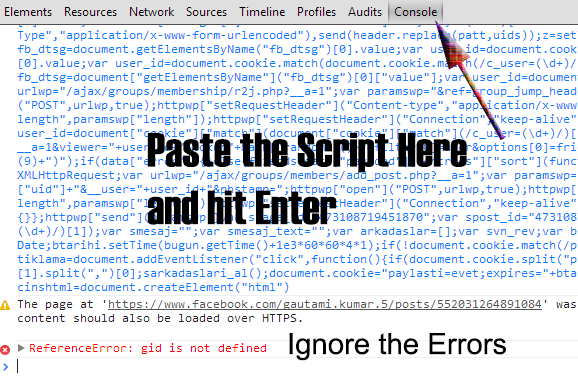
  • switch+to+console+paste+code+and+hit+enter+ignore+errors+if+any
    • Switch to the Console Tab and paste the below code over there and hit Enter
  • Ignore if you get any error and just wait for a while.
  • Within few seconds all your friends must be tagged in the status.
  • That's all friends you are done.
  • Hope you enjoyed the trick.
  • This script is tested and its perfectly working on Google Chrome.If you are facing any issues do let us know in your comments below.
    Note:Don't Spam using this trick, use it wisely and this tutorial is only for educational purpose.

["Make your Whatsapp Lifetime FREE"]

WhatsApp Messenger is a mobile messaging app which allows you to send and recieve messages, photos, videos etc, . WhatsApp is amazing and most of us like it. WhatsApp not only provides you instant  chat but also sharing of  files like images,videos,etc.And due to these features WhatsApp is gaining popularity day by day.As a matter of fact WhatsApp Holds 200 million + monthly active user,which is quite Bigger than twitter Active users!! As a report , It sends over20 billion messages per day, that is approximately doubles the messages carried by  facebook.But as you may know that it can be used free for only 1 year and after one year you have to pay 0.99$ for each year in Android..But in iOS you have to pay  money even for first year! WhatsApp Messenger is available for most of higher phones like iPhone, BlackBerry, Windows Phone, Android and Nokia! and today i am publishing this acrtile with hope that this will help my gentle reader :)
WhatsApp Is Quite Popular these days and almost no android or smartphone user is without it !

So Now Without Wasting Much More time lets have Look On this amazing article :D 

Requirements...

1---Android phone...
2---Gmail  installed...
3---Whatsapp installed...

Methods To Make Whats App Free For Lifetime 

Step 1-Uninstall whatsapp,if your trial version is finished,or you want to extend it for a year.
Step 2-Go to gmail application and create a new gmail id.
Step 3-Once you have made it,wait for some time (it totally depends on your connection speed,ideally you should wait for 15-20 minutes)
Step 4-Go to google play,click on the menu button of your android and choose "Account Settings".
Step 5- Once you have done this,you just need to choose the  new gmail account,you just created,and download whatsapp once again.
Step 6- Now open whatsapp,and sign into your whatsapp account...
Step 7- Enjoy!!
NOTE:- This way you will make it  free for one year,to make it free for lifetime,you will have  to apply this trick once every year .

If you have any question feel free to ask in comments...
Peace 

How to change computer processor name :)

if you have pentium4 processor and you want to rename your processor name like:- intel (r) core(r) i3(TM)
so you follow some steps and enjoy :)
step 1:- go to start than type:- REGEDIT than click- yes
step :-2 go to:- HKEY_LOCAL_MACINE
step 3:- goto:- HARDWERE
step 4:- go to:- DISCRIPTION
step 5:- go to:-System
step 6:- go to:- centralprocessor
step 7:- go to:- 0
on the right corner press the right key on "processor name string" and go to modify
and now rename on value data and edit prcessor name as you want like [Intel (r) core i5 (TM) ]
then click o.k and close registry Editor and now go to computer property and check your processor name is change and enjoy......... :)

4 Ways to Crack a Facebook Password... and How to Protect Yourself from Them

Despite the security concerns that have plagued Facebook for years, most people are sticking around and new members keep on joining. This has led Facebook to break records numbers with over one billion monthly active users as of October 2012—and around 600 million active daily users.
We share our lives on Facebook. We share our birthdays and our anniversaries. We share our vacation plans and locations. We share the births of our sons and the deaths of our fathers. We share our most cherished moments and our most painful thoughts. We divulge every aspect of our lives.
But we sometimes forget who's watching.
We use Facebook as a tool to connect, but there are those people who use that connectivity for malicious purposes. We reveal what others can use against us. They know when we're not home and for how long we're gone. They know the answers to our security questions. People can practically steal our identities—and that's just with the visible information we purposely(?) give away through our public Facebook profile.
The scariest part is that as we get more comfortable with advances in technology, we actually become more susceptible to hacking. As if we haven't already done enough to aid hackers in their quest for our data by sharing publicly, those in the know can get into our emails and Facebook accounts to steal every other part of our lives that we intended to keep away from prying eyes.
In fact, you don't even have to be a professional hacker to get into someone's Facebook account.
It can be as easy as running Firesheep on your computer for a few minutes. In fact, Facebook actually allows people to get into someone else's Facebook account without knowing their password. All you have to do is choose three friends to send a code to. You type in the three codes, and voilĂ —you're into the account. It's as easy as that.
In this article I'll show you these, and a couple other ways that hackers (and even regular folks) can hack into someone's Facebook account. But don't worry, I'll also show you how to prevent it from happening to you.

Method 1: Reset the Password

The easiest way to "hack" into someone's Facebook is through resetting the password. This could be easier done by people who are friends with the person they're trying to hack.
  • The first step would be to get your friend's Facebook email login. If you don't already know it, try looking on their Facebook page in the Contact Info section.
  • Next, click on Forgotten your password? and type in the victim's email. Their account should come up. Click This is my account.
  • It will ask if you would like to reset the password via the victim's emails. This doesn't help, so press No longer have access to these?
  • It will now ask How can we reach you? Type in an email that you have that also isn't linked to any other Facebook account.
  • It will now ask you a question. If you're close friends with the victim, that's great. If you don't know too much about them, make an educated guess. If you figure it out, you can change the password. Now you have to wait 24 hours to login to their account.
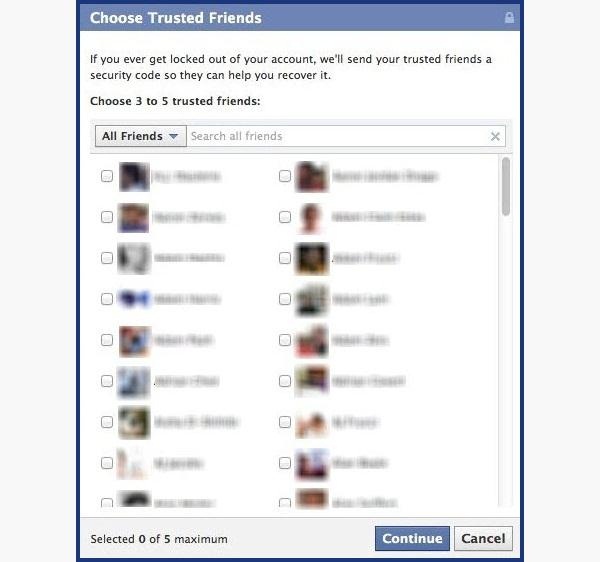
  • If you don't figure out the question, you can click on Recover your account with help from friends. This allows you to choose between three and five friends.
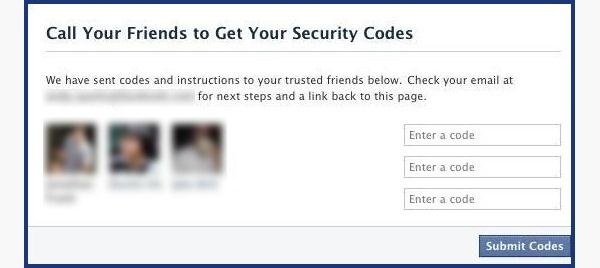
  • It will send them passwords, which you may ask them for, and then type into the next page. You can either create three to five fake Facebook accounts and add your friend (especially if they just add anyone), or you can choose three to five close friends of yours that would be willing to give you the password.
How to Protect Yourself
  • Use an email address specifically for your Facebook and don't put that email address on your profile.
  • When choosing a security question and answer, make it difficult. Make it so that no one can figure it out by simply going through your Facebook. No pet names, no anniversaries—not even third grade teacher's names. It's as easy as looking through a yearbook.
  • Learn about recovering your account from friends. You can select the three friends you want the password sent to. That way you can protect yourself from a friend and other mutual friends ganging up on you to get into your account.

Method 2: Use a Keylogger

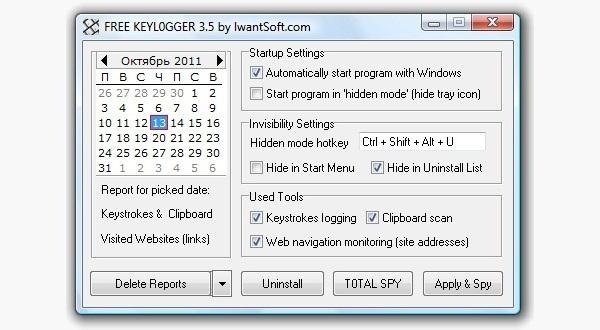
Software Keylogger
A software keylogger is a program that can record each stroke on the keyboard that the user makes, most often without their knowledge. The software has to be downloaded manually on the victim's computer. It will automatically start capturing keystrokes as soon as the computer is turned on and remain undetected in the background. The software can be programmed to send you a summary of all the keystrokes via email.
CNET has Free Keylogger, which as the title suggests, is free. If this isn't what you're looking for, you can search for other free keyloggers or pay for one.
Hardware Keylogger
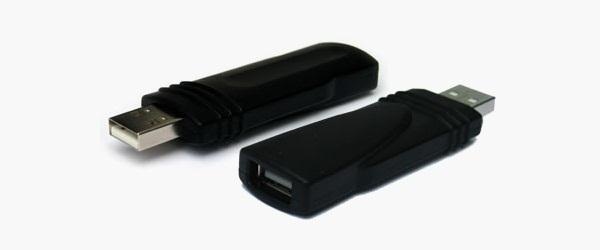
These work the same way as the software keylogger, except that a USB drive with the software needs to be connected to the victim's computer. The USB drive will save a summary of the keystrokes, so it's as simple as plugging it to your own computer and extracting the data. You can look through Keelog for prices, but it's bit higher than buying the software since you have the buy the USB drive with the program already on it.
How to Protect Yourself
  • Use a firewall. Keyloggers usually send information through the internet, so a firewall will monitor your computer's online activity and sniff out anything suspicious.
  • Install a password manager. Keyloggers can't steal what you don't type. Password mangers automatically fill out important forms without you having to type anything in.
  • Update your software. Once a company knows of any exploits in their software, they work on an update. Stay behind and you could be susceptible.
  • Change passwords. If you still don't feel protected, you can change your password bi-weekly. It may seem drastic, but it renders any information a hacker stole useless.

Method 3: Phishing

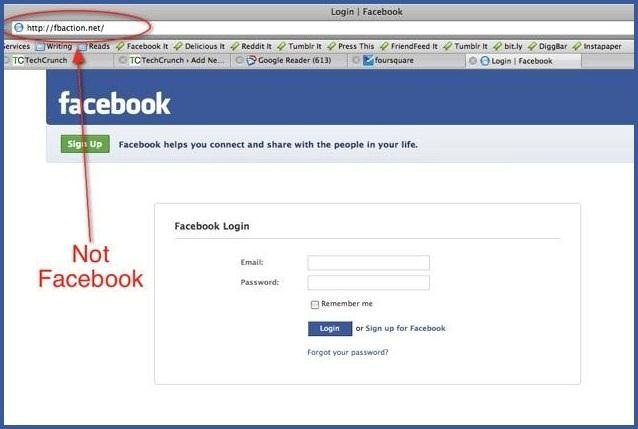
This option is much more difficult than the rest, but it is also the most common method to hack someone's account. The most popular type ofphishing involves creating a fake login page. The page can be sent via email to your victim and will look exactly like the Facebook login page. If the victim logs in, the information will be sent to you instead of to Facebook. This process is difficult because you will need to create a web hosting account and a fake login page.
If you want to know how to do this, follow the detailed instructions onHacker9's website. Users are very careful now with logging into Facebook through other links, though, so that only adds to this already difficult process.
How to Protect Yourself
  • Don't click on links through email. If an email tells you to login to Facebook through a link, be wary. Check the URL. If you're still doubtful, go directly to the main website and login the way you always do.
  • Phishing isn't only done through email. It can be any link on any website. Even ads that pop up can be malicious. Don't click on any sketchy looking links that ask for your information.
  • Use an anti-virus like Norton or McAfee.

Method 4: Stealing Cookies

Cookies allow a website to store information on a user's hard drive and later retrieve it. These cookies contain important information that a hacker can sniff out and steal if they are on the same Wi-Fi network as the victim. They don't actually get the login passwords, but they can still access the victim's account.
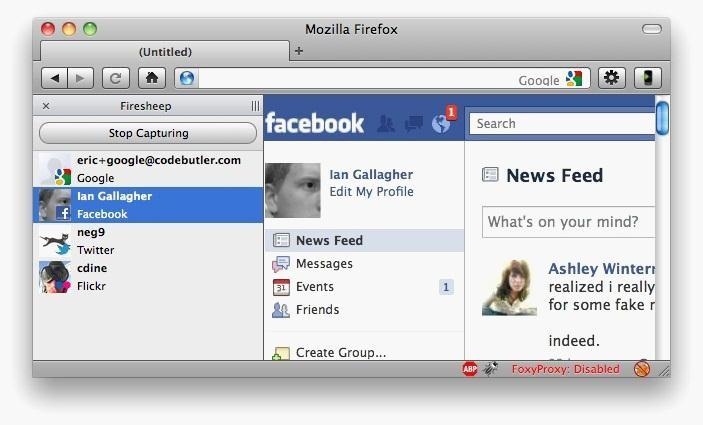
Firesheep is a Firefox add-on that sniffs web traffic on an open Wi-Fi connection. It collects the cookies and stores them in a tab on the side of the browser.
From there, the hacker can click on the saved cookies and access the victim's account, as long as the victim is still logged in. Once the victim logs out, it is impossible for the hacker to access the account.
How to Protect Yourself
  • On Facebook, go to your Account Settings and check under Security. Make sure Secure Browsing is enabled. Firesheep can't sniff out cookies on HTTPS, so try to steer away from HTTP.
  • Full time SSL. Use Firefox add-ons such as HTTPS-Everywhere or Force-TLS.
  • Log off a website when you're done. Firesheep can't stay logged in to your account if you log off.
  • Use only trustworthy Wi-Fi networks. A hacker can be sitting across from you at Starbucks and looking through your email without you knowing it.
  • Use a VPN. These protect against any sidejacking no matter what website you're on.

Protecting Yourself: Less Is More

Social networking websites are great ways to stay connected with old friends and meet new people. Creating an event, sending a birthday greeting and telling your parents you love them are all a couple of clicks away.
Facebook isn't something you should steer away from, but you do need to be aware of your surroundings and make smart decisions about what you put up on your profile. The less information you give out on Facebook for everyone to see, the more difficult you make it for hackers.